> ## Documentation Index
> Fetch the complete documentation index at: https://docs.hire.inc/llms.txt
> Use this file to discover all available pages before exploring further.
# Integration guide
Welcome to the Hire.inc Zapier Integration Guide! By integrating with Zapier, you can streamline and automate various HR and recruiting tasks, seamlessly syncing Hire.inc with thousands of other apps and services. This integration empowers you to build efficient workflows, reduce manual effort, and focus on what truly matters—finding the right talent.
## Before You Begin
To connect Zapier with Hire.inc, ensure that you have:
* A subscribed Hire.inc account.
* A user role of **"Owner"** or **"Collaborator"**.
These permissions are necessary to access API keys and establish the integration.
## Creating an API Key
To integrate Hire.inc with Zapier, you'll need to generate an API key from your Hire.inc account.
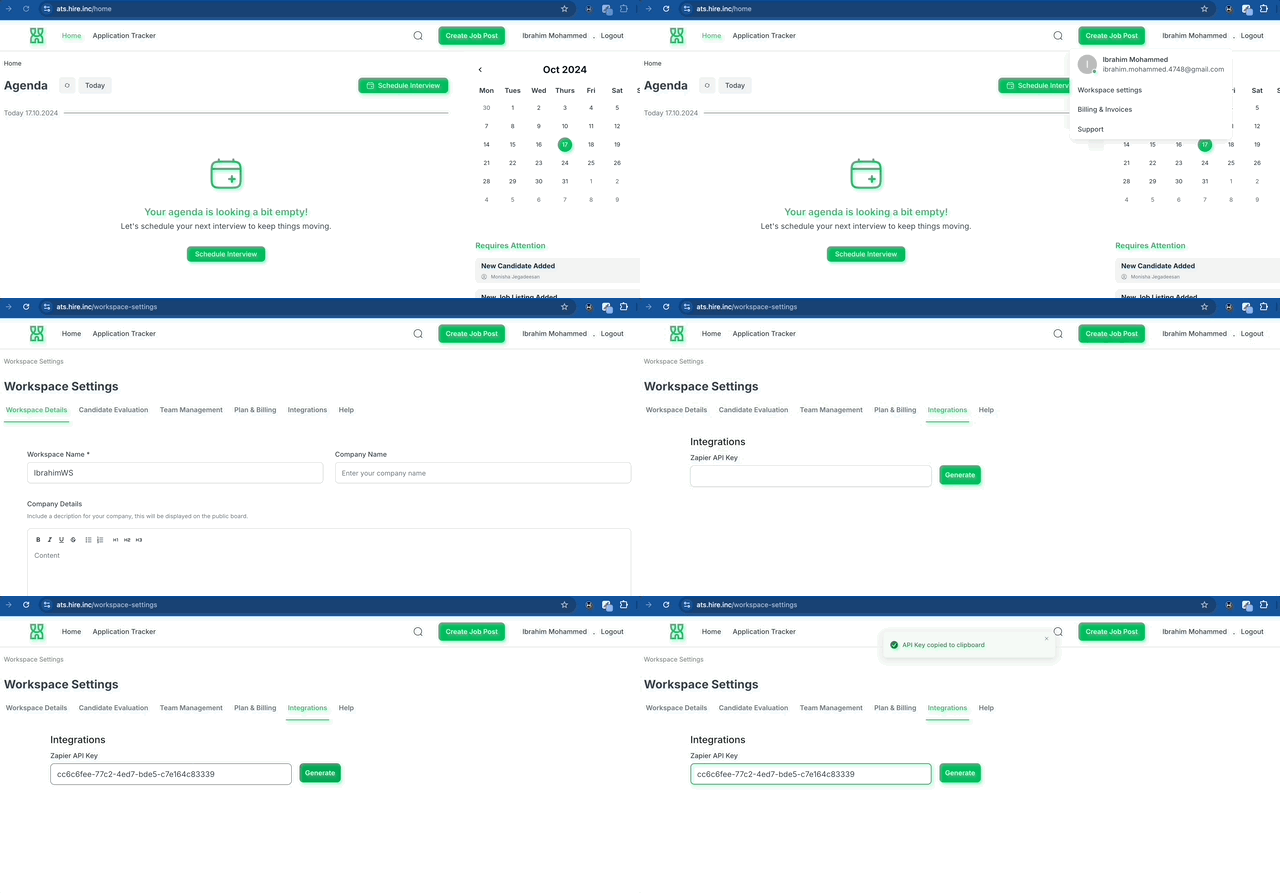 **Follow these steps:**
Log in to your [Hire.inc dashboard](https://ats.hire.inc/home) to see your
dashboard.
Click on the upper-right dropdown menu (where you see your name) and select
**"Workspace Settings."**
Select **"Integrations"** Tab.
Under **"Zapier API Key"** label, click the **"Generate"** button to create
a new API key.
Click on the generated key to copy it, or copy it manually to your
clipboard.
This key is your secret—keep it secure!
## Connecting Zapier
Now that you have your API key, you're ready to connect Hire.inc with Zapier.
**Steps to Integrate:**
Go to [Zapier](https://zapier.com/apps/hireinc/integrations) to add Hire.inc
app and create your first Zap.
When prompted during the Zap creation, select **Hire.inc** as your app and
choose the desired trigger or action.
Paste your Hire.inc API key into the Zapier authentication window and click
**"Continue."**
You're all set! Start creating Zaps using Hire.inc's available triggers and
actions to automate your workflows.
**Follow these steps:**
Log in to your [Hire.inc dashboard](https://ats.hire.inc/home) to see your
dashboard.
Click on the upper-right dropdown menu (where you see your name) and select
**"Workspace Settings."**
Select **"Integrations"** Tab.
Under **"Zapier API Key"** label, click the **"Generate"** button to create
a new API key.
Click on the generated key to copy it, or copy it manually to your
clipboard.
This key is your secret—keep it secure!
## Connecting Zapier
Now that you have your API key, you're ready to connect Hire.inc with Zapier.
**Steps to Integrate:**
Go to [Zapier](https://zapier.com/apps/hireinc/integrations) to add Hire.inc
app and create your first Zap.
When prompted during the Zap creation, select **Hire.inc** as your app and
choose the desired trigger or action.
Paste your Hire.inc API key into the Zapier authentication window and click
**"Continue."**
You're all set! Start creating Zaps using Hire.inc's available triggers and
actions to automate your workflows.